DictCache
full name: tenpy.tools.cache.DictCache
parent module:
tenpy.tools.cachetype: class
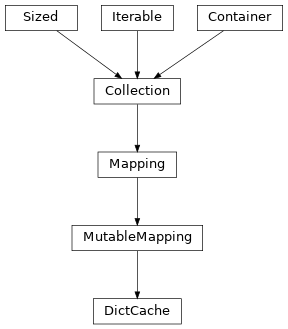
Inheritance Diagram
Methods
|
|
Create another |
|
|
Same as |
|
If key is not found, d is returned if given, otherwise KeyError is raised. |
as a 2-tuple; but raise KeyError if D is empty. |
|
|
Pre-load the data for one or more keys from disk to RAM. |
Set keys for data which should be kept in RAM for a while. |
|
|
|
Create a trivial storage that keeps everything in RAM. |
|
|
If E present and has a .keys() method, does: for k in E: D[k] = E[k] If E present and lacks .keys() method, does: for (k, v) in E: D[k] = v In either case, this is followed by: for k, v in F.items(): D[k] = v |
- class tenpy.tools.cache.DictCache(storage)[source]
Bases:
MutableMappingCache with dict-like interface.
The idea of the Cache is to save data that isn’t needed for a while in a long-term
Storagecontainer in order to free RAM. While the defaultStorageis just an interface around a plain dictionary and hence actually does keep everything in RAM, this class is designed to handle also the case of other storage classes like thePickleCacheorHdf5Cache. To avoid unnecessary read-write cycles, it keeps some values in a “short-term” cache in memory, seeset_short_term_keys().Using the
preload()method allows to generalize to theThreadedDictCache, which can save/load data in parallel without blocking the main thread execution while waiting for disk input/output.Note
To allow a proper closing of opened storage, it is highly recommended to use the
DictCacheas a context manager in awithstatement, seeopen().- Parameters:
storage (
Storage) – Container for saving the data long-term.
- short_term_cache
Dictionary for keeping a “short-term” memory of the keys in short_term_keys.
- Type:
Examples
The
DictCachehas as dict-like interface accepting strings as keys. The keys should be acceptable as filenames and not contain “/”.>>> cache = DictCache.trivial() >>> cache['a'] = 1 >>> cache['b'] = 2 >>> assert cache['a'] == 1 >>> assert cache.get('b') == 2 >>> 'b' in cache True >>> 'c' in cache False >>> assert cache.get('c', default=None) is None
- create_subcache(name)[source]
Create another
DictCachebased on the same storage resource.Uses
Storage.subcontainer()to create another storage container for a newDictCache. The data is still completely owned by the top-mostStorage(in turn owned by theCacheFile). Hence, closing the parentCacheFilewill close allDictCacheinstances generated with create_subcache; accessing the data is no longer possible afterwards.
- set_short_term_keys(*keys)[source]
Set keys for data which should be kept in RAM for a while.
Disk input/output is slow, so we want to avoid unnecessary read/write cycles. This method allows to specify keys the data of which should be kept in RAM after setting/ reading, until the keys are updated with the next call to
set_short_term_keys(). The data is still written to disk in eachself[key] = data, but (subsequent) readingdata = self[key]will be fast for the given keys.- Parameters:
*keys (str) – The keys for which data should be kept in RAM for quick short-term lookup.
- preload(*keys, raise_missing=False)[source]
Pre-load the data for one or more keys from disk to RAM.
- Parameters:
*keys (str) – The keys which should be pre-loaded. Are added to the
short_term_keys.raise_missing (bool) – Whether to raise a KeyError if a given key does not exist in self.
- clear() None. Remove all items from D.
- items() a set-like object providing a view on D's items
- keys() a set-like object providing a view on D's keys
- pop(k[, d]) v, remove specified key and return the corresponding value.
If key is not found, d is returned if given, otherwise KeyError is raised.
- popitem() (k, v), remove and return some (key, value) pair
as a 2-tuple; but raise KeyError if D is empty.
- setdefault(k[, d]) D.get(k,d), also set D[k]=d if k not in D
- update([E, ]**F) None. Update D from mapping/iterable E and F.
If E present and has a .keys() method, does: for k in E: D[k] = E[k] If E present and lacks .keys() method, does: for (k, v) in E: D[k] = v In either case, this is followed by: for k, v in F.items(): D[k] = v
- values() an object providing a view on D's values