CacheFile
full name: tenpy.tools.cache.CacheFile
parent module:
tenpy.tools.cachetype: class
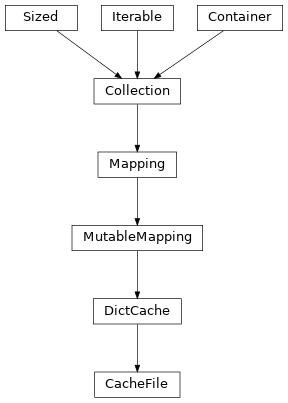
Inheritance Diagram
Methods
|
|
Close the associated storage container and shut down. |
|
Create another |
|
|
Same as |
|
Interface for opening a |
|
If key is not found, d is returned if given, otherwise KeyError is raised. |
as a 2-tuple; but raise KeyError if D is empty. |
|
|
Pre-load the data for one or more keys from disk to RAM. |
Set keys for data which should be kept in RAM for a while. |
|
|
|
Create a trivial storage that keeps everything in RAM. |
|
|
If E present and has a .keys() method, does: for k in E: D[k] = E[k] If E present and lacks .keys() method, does: for (k, v) in E: D[k] = v In either case, this is followed by: for k, v in F.items(): D[k] = v |
- class tenpy.tools.cache.CacheFile(storage)[source]
Bases:
DictCacheSubclass of
DictCacheto handle opening and closing resources.You should open this class with the
open()method (ortrivial()), and make sure that you callclose()after usage. The easiest way to ensure this is to use awithstatement, seeopen().- classmethod open(storage_class='Storage', use_threading=False, delete=True, max_queue_size=2, **storage_kwargs)[source]
Interface for opening a
Storageand creating aDictCachefrom it.Default parameters just give a dummy cache that keeps everything in memory. If you want to activate it to actually save things to disk, we found that the following
cache_paramsparameters worked reasonably well, to be used for the simulation’s seeinit_cache:cache_params: storage_class: PickleStorage use_threading: True # reduce the OMP_NUM_THREADS if you use this! # further specify `directory` or `tmpdir` on the cluster node's local file system
Warning
Make sure that you call the
close()method of the returnedCacheFileto close opened files and clean up temporary files/directories. One way to ensure this is to use the class in awithstatement like this:with CacheFile.open(...) as cache: cache['my_data'] = (1, 2, 3) assert cache['my_data'] == (1, 2, 3) # cache is closed again here, don't use it anymore
The
Simulationhandles it for you.- Parameters:
storage_class (str) – Name for a subclass of
Storageto define how data is saved. Use justStorageto keep things in RAM, or, e.g.,PickleStorageto actually save things to disk.use_threading (bool) – If True, use the
ThreadedStoragewrapper for thread-parallel disk I/O. In that case, you need to use the cache in a with statement (or manually call__enter__()and__exit__()).delete (bool) – If True, delete the opened file/directory after closing the cache.
max_queue_size (int) – Only used for use_threading. Needs to be positive to limit the number of environments kept in RAM in case the disk is much slower then the actual update.
**storage_kwargs – Further keyword arguments given to the
Storage.open()method of the storage_class.
- clear() None. Remove all items from D.
- create_subcache(name)[source]
Create another
DictCachebased on the same storage resource.Uses
Storage.subcontainer()to create another storage container for a newDictCache. The data is still completely owned by the top-mostStorage(in turn owned by theCacheFile). Hence, closing the parentCacheFilewill close allDictCacheinstances generated with create_subcache; accessing the data is no longer possible afterwards.
- items() a set-like object providing a view on D's items
- keys() a set-like object providing a view on D's keys
- pop(k[, d]) v, remove specified key and return the corresponding value.
If key is not found, d is returned if given, otherwise KeyError is raised.
- popitem() (k, v), remove and return some (key, value) pair
as a 2-tuple; but raise KeyError if D is empty.
- preload(*keys, raise_missing=False)[source]
Pre-load the data for one or more keys from disk to RAM.
- set_short_term_keys(*keys)[source]
Set keys for data which should be kept in RAM for a while.
Disk input/output is slow, so we want to avoid unnecessary read/write cycles. This method allows to specify keys the data of which should be kept in RAM after setting/ reading, until the keys are updated with the next call to
set_short_term_keys(). The data is still written to disk in eachself[key] = data, but (subsequent) readingdata = self[key]will be fast for the given keys.- Parameters:
*keys (str) – The keys for which data should be kept in RAM for quick short-term lookup.
- setdefault(k[, d]) D.get(k,d), also set D[k]=d if k not in D
- update([E, ]**F) None. Update D from mapping/iterable E and F.
If E present and has a .keys() method, does: for k in E: D[k] = E[k] If E present and lacks .keys() method, does: for (k, v) in E: D[k] = v In either case, this is followed by: for k, v in F.items(): D[k] = v
- values() an object providing a view on D's values